
Projects page interface
The SimForm entry page, called Projects, allows you to create, manage, and track projects.
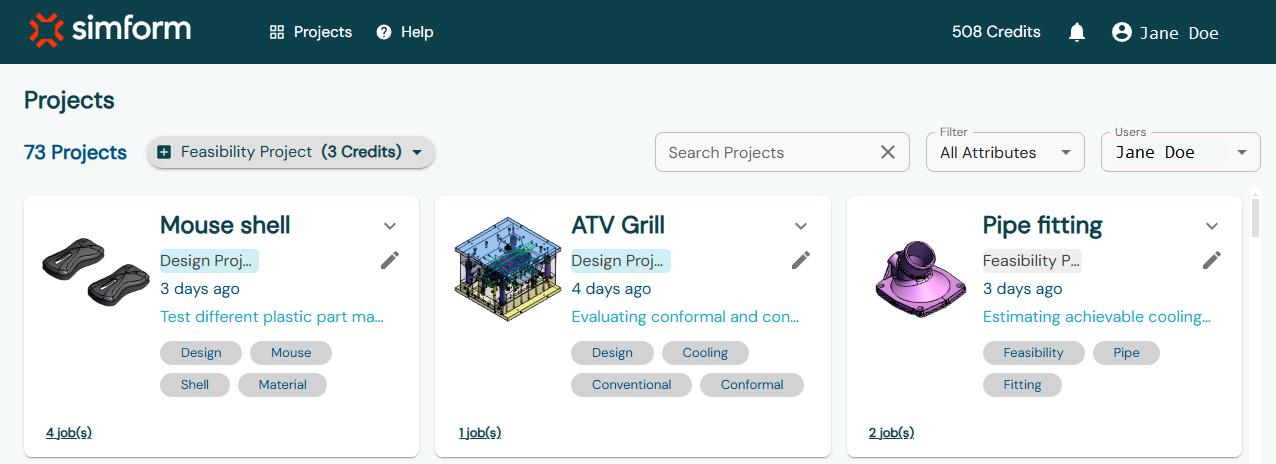
| Top navigation bar | |
| Lets you access the help resources and account management options. | |
| SimForm logo | Lets you access the projects page from any other page. |
 Projects
 |
Lets you access the projects page from any other page. |
 Help
Help |
Displays the help options list.
|
| Credits | Displays the available credits in your account. The company account administrator can choose to hide credits information for invited users by clearing the Display Credits for Invited Users check box on the My Account page. |
 Notification bell Notification bell |
Displays SimForm notifications, such as when an invited user accepts a company account invitation that you sent. |
 <User name>
 |
Opens the settings menu for your account.
|
| Projects | |
| Allows you to create new projects, list
and edit all the projects you have created. The company account administrator can view and edit projects created by other users within the company account. |
|
| <Project type> button | Displays the selected project type.
|
| Search Projects | Allows you to enter keywords to filter and find specific projects. |
| Filter | Allows you to filter projects by attributes such as project name, description, tags, or all available attributes. |
| Users | Allows you to filter projects by usernames associated with a company account. |
| Project cards | Displays a preview of the model, including its name, type,
description, tags, creation date, and the number of associated
jobs.
|


 Add—Opens the
 List—Opens the
list of project types.
List—Opens the
list of project types.  More—Shows the list of jobs
associated with the project.
More—Shows the list of jobs
associated with the project. Less—Hides the list of jobs
associated with the project.
Less—Hides the list of jobs
associated with the project. Edit—Lets you edit project
details such as project name, description and tags.
Edit—Lets you edit project
details such as project name, description and tags.